 SmartStreamer4
Download v0.3.3
- Windows
Released 2026-09-27. SHA-256 checksum · Release notes. SmartStreamer4 is free and MIT licensed.
What it does
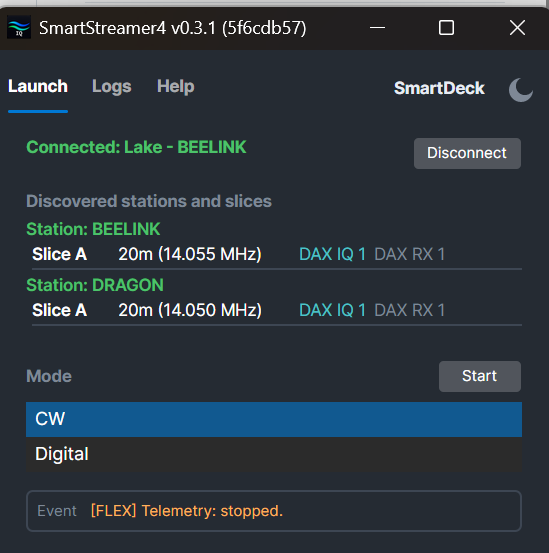
- CW Mode streams DAX-IQ audio into CW Skimmer, with per-slice instances synchronized to your panadapter and slice frequencies, and decoded spots reconciled back to the radio.
- Digital Mode configures and launches per-slice WSJT-X, JTDX, or WSJT-Z instances for FT8 and FT4, wired to DAX audio and SmartSDR CAT.
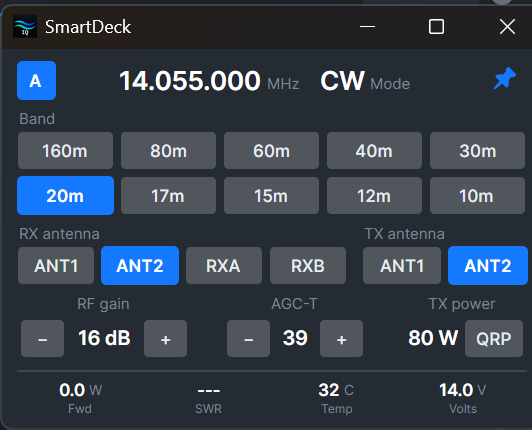
- SmartDeck is a compact control panel you can park beside SmartSDR: live power, SWR, PA temperature and voltage, band buttons that remember the frequency, mode, and antennas you last used, a control row for RF gain, AGC-T, RIT, XIT, and transmit power, each set with the mouse wheel, and DIV, NB, NR, and APF buttons that light to match the radio.
- Light and Dark themes, switched from the tab strip and remembered between sessions. The app opens in Light; the screenshots above are Dark.
- A setup wizard opens on first launch and walks you through the CW Skimmer configuration.
- Checks for new releases and links to the release notes from the Help tab.
- A single self-contained executable: no installer, no .NET setup. Settings live in
%APPDATA%\SmartStreamer4and survive updates.
SmartStreamer4 needs Windows 10 or 11 and SmartSDR 4.x with DAX installed on the same PC. CW Mode needs CW Skimmer; Digital Mode needs WSJT-X, JTDX, or WSJT-Z.
Installing
Unzip the download and run SmartStreamer4.exe. There is no installer. Allow firewall access if Windows prompts. The app is code signed, so Windows names Christopher Lawson White as the publisher instead of Unknown publisher. If SmartScreen still warns the first time, which happens while a new signature earns its reputation, choose More info, then Run anyway.
Updating from any earlier version, including the v0.1.x betas, works the same way: replace the executable and run it. Your settings are kept.